1. 원격 레포지토리에서 브랜치 지우는 명령어
git push origin --delete main
위의 명령어는 로컬 브랜치는 여전히 남아있다. 이때는 로컬 브랜치도 지워주자
git branch -D main
'git' 카테고리의 다른 글
| github default branch 변경하는 법 (0) | 2024.06.18 |
|---|
1. 원격 레포지토리에서 브랜치 지우는 명령어
git push origin --delete main
위의 명령어는 로컬 브랜치는 여전히 남아있다. 이때는 로컬 브랜치도 지워주자
git branch -D main
| github default branch 변경하는 법 (0) | 2024.06.18 |
|---|
1. 레포지토리의 settings로 들어갑니다.
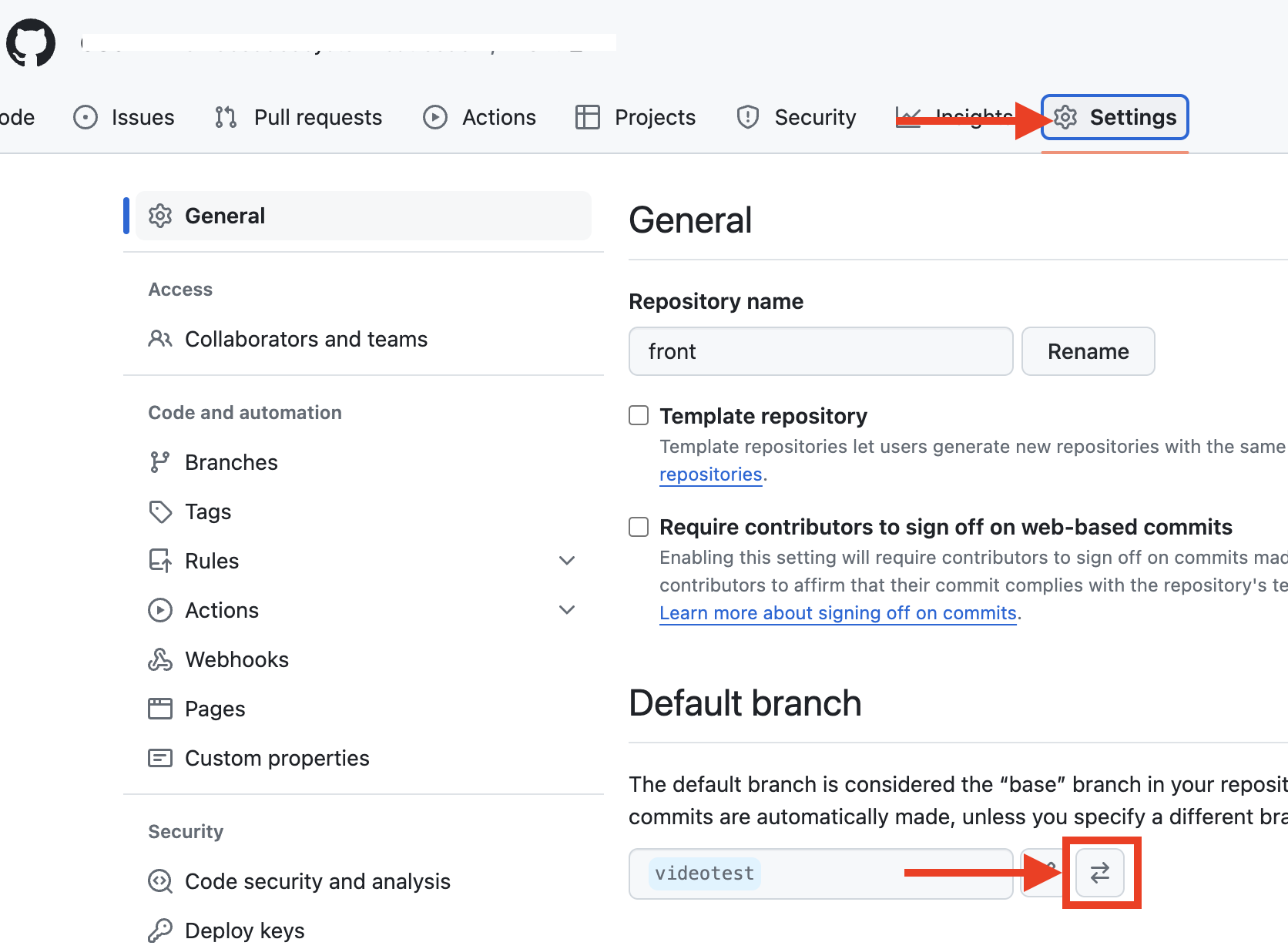
2. branch 선택하고 update 클릭

3. 버튼 클릭

| git branch 각종 명령어 - 브랜치 지우기 (0) | 2024.06.18 |
|---|
1. 시간 초과 코드
: people 이라는 리스트에 전부다 넣고, 길이가 2이면 새로운 find_people 리스트에 넣어서 하나씩 출력하는 형태의 코드를 작성했다. 당연히 시간 초과!
import sys
def input()->str:
    return sys.stdin.readline().rstrip()

n, m = map(int, input().split())
#n 듣도 못한 사람의 수
#m 보도 못한 사람의 수

people=[]

for i in range(n+m):
    people.append(input())
num=0
find_people=[]
while(len(people)!=0):
    tem_people=people[0]
    if people.count(tem_people)==2:
        find_people.append(tem_people)
        del people[0]
        num+=1
    else: #개수 하나
        del people[0]
print(num)
find_people.sort()
for j in find_people:
    print(j)
2. 두 리스트에서 공통인 것만 출력하는 기능을 활용한다. 교집합 개념 활용!! (성공)
import sys
def input()->str:
    return sys.stdin.readline().rstrip()

n, m = map(int, input().split())
#n 듣도 못한 사람의 수
#m 보도 못한 사람의 수

people_who_dont_hear=[]
people_who_dont_see=[]

for i in range(n):
    people_who_dont_hear.append(input())

for j in range(n):
    people_who_dont_see.append(input())

intersection = list(set(people_who_dont_hear) & set(people_who_dont_see))
intersection.sort()
print(len(intersection))
for i in intersection:
    print(i)
| 정렬 문제 타파하기 | python 알고리즘 (0) | 2024.07.30 |
|---|---|
| 2004 python 조합 0의 개수 (2) | 2024.07.14 |
| 18111 마인크래프트 백준 python (0) | 2023.09.01 |
| 백준 1654 랜선 자르기 코드 및 설명 (0) | 2023.09.01 |
| 백준 15829 python Hashing 문제 풀이 (0) | 2023.08.29 |